

How To Fix Registration Issue On 666rs Game
Registration Issue Solution Overview
Trying to create a new account on 666rs official Game but the registration page is not working? This can happen for several simple reasons, such as an incorrect phone number, weak internet connection, an outdated app, or temporary server problems.
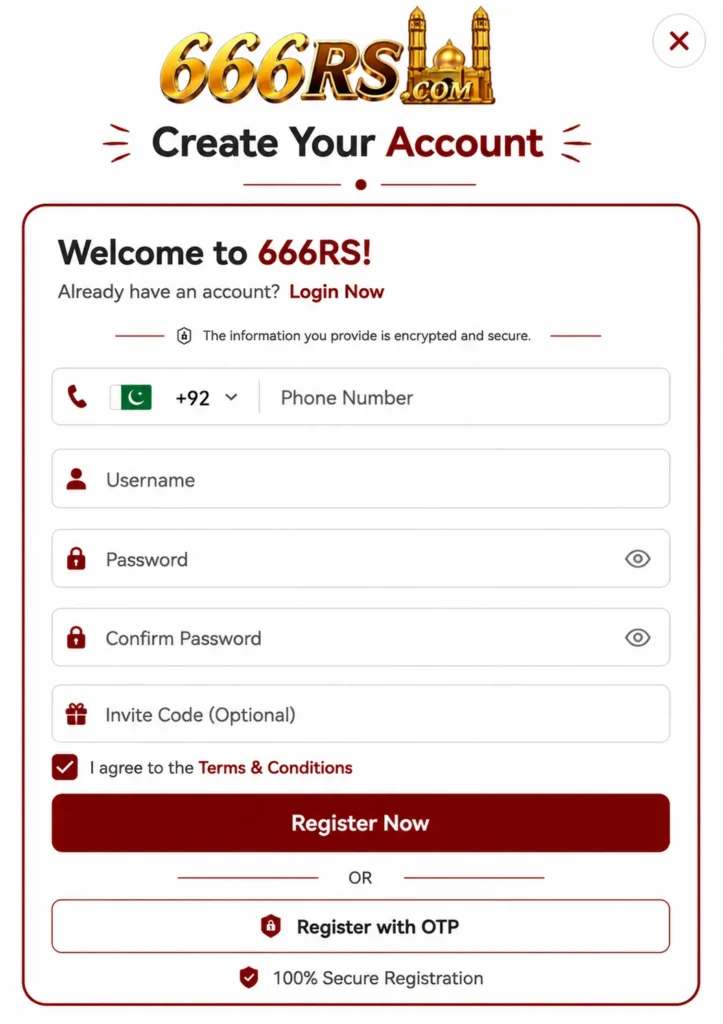
Most registration issues do not require complicated solutions. In many cases, checking your details and refreshing the app is enough to complete the signup process. Below are the most common problems and practical ways to fix them.
Check Your Internet Connection
A weak or unstable internet connection is one of the first things to check. If the registration page keeps loading, fails to open, or shows an error after you tap the register button, your connection may be responsible.
Try switching between Wi-Fi and mobile data. You can also turn airplane mode on for a few seconds and then turn it off. After reconnecting to the internet, open 666rs Game again and try registering.
Make Sure Your Phone Number Is Correct
The phone number is an important part of the registration process. A single incorrect digit can prevent the account from being created or stop the verification code from arriving.
Before submitting the form, carefully check the number you entered. Make sure you are using the correct country code if the registration form requires one.
Also, avoid adding unnecessary spaces or symbols to the phone number.
Check Your Verification Code
Sometimes the registration form works correctly but the OTP or verification code does not arrive.
If this happens, wait for a short while before requesting another code. Repeatedly pressing the resend button can sometimes make the process more confusing.
You should also check whether your phone has proper network coverage and whether messages from unknown numbers are being blocked.
Quick Points To Check
- Enter your phone number carefully.
- Use a stable internet connection.
- Check your SMS inbox for the verification code.
- Avoid requesting multiple OTPs quickly.
- Make sure the app or website is updated.
- Try again after a short break if the server is busy.
Clear App Cache And Restart
If you are using the 666rs Game app, an overloaded or corrupted cache can sometimes cause pages and forms to behave incorrectly.
On Android, open your phone’s app settings, find the 666rs Game app, and look for the storage options. Clear the cache and then restart the application.
Do not clear app data unless you are comfortable signing in again, because clearing data may remove locally stored login on app information.
Update The 666rs Game App
An older version of an app may not work properly with the current registration system. If the registration button does nothing or the signup page keeps showing an error, check whether a newer version is available from the official source you normally use.
After updating, close the app completely and open it again. Then try the registration process from the beginning.
Try A Different Browser
If you are registering through a website instead of the app, the problem could be related to your browser.
First, refresh the registration page. If the issue remains, try another updated browser. You can also open the page in private or incognito mode.
This can help when old cookies, cached files, or browser extensions interfere with the registration form.
Check Your Registration Details
Sometimes registration fails because one of the required fields has not been completed correctly. Go through the form once more before submitting it.
| Problem | What To Try |
|---|---|
| Registration page won’t open | Check internet and refresh |
| OTP not received | Check network and wait before resending |
| Register button not responding | Refresh the page or restart the app |
| Invalid phone number | Recheck number and country code |
| App keeps crashing | Clear cache and update the app |
| Registration still fails | Try another browser or contact support |
Avoid entering random information just to get past an error. Your registration details should be accurate and entered according to the platform’s requirements.
Restart Your Device
It sounds simple, but restarting your phone can solve temporary app and network problems.
Close 666rs Game, restart the device, reconnect to the internet, and open the registration page again. This is especially useful if other apps are also freezing or your internet connection has recently become unstable.
Check For Temporary Server Problems
Sometimes the issue is not on your side at all. If the 666rs Game registration system is temporarily busy or undergoing maintenance, you may be unable to create an account even when everything on your phone is working normally.
If you have already checked your internet, phone number, browser, and app, wait for some time and try again later.
Avoid repeatedly submitting the registration form because it will not fix a server-side problem.
Contact Customer Support
If you have tried the basic fixes and registration still does not work, customer support may need to check the issue from their side.
When contacting support, explain the exact problem instead of simply saying that registration is not working. For example, mention whether the OTP is missing, the registration button does not respond, or an error message appears.
Do not share your password, OTP, or other private account information with anyone claiming to provide support.
Final Check Before Registering Again
Before trying one more time, quickly check these things:
- Your internet connection is stable.
- Your phone number is entered correctly.
- You have entered all required registration details.
- Your verification code is still valid.
- The app or browser is updated.
- Cache has been cleared if necessary.
- There is no temporary service interruption.
Once these points are checked, return to the registration page and complete the signup process carefully.
FAQs
Why is my 666rs Game registration not working?
It may be caused by an incorrect phone number, unstable internet, outdated app, browser cache, or a temporary server problem. Check each of these before trying again.
Why am I not receiving the registration OTP?
Check your mobile signal and make sure the phone number is correct. Wait a little before requesting another code, as repeated requests may cause delays.
Can clearing the app cache fix registration?
Yes, clearing the cache can help when temporary or corrupted cached files are affecting the registration page. After clearing it, restart the app and try again.
What should I do if the registration page keeps loading?
First check your internet connection and refresh the page. If that does not help, try another browser or switch between Wi-Fi and mobile data.
What if none of these solutions work?
The problem may be temporary or related to the registration system itself. In that situation, wait and try again later or contact the platform’s official customer support.
Conclusion
A registration problem on 666rs Game does not always mean there is a serious issue with your device or account. Start with the basics: check your internet, confirm your phone number, verify the OTP, clear the app cache, and make sure you are using an updated version.
If the problem continues after trying these steps, it may be a temporary server-side issue. Give it some time and contact official customer support if necessary. Most common registration problems can be resolved with a few simple checks.